


Why Integration Is Simpler Than Most Manufacturers Expect
Most businesses assume connecting their ERP and CRM is a six-month project. For many, it no longer is.
Ask a manufacturer or distributor why their ERP data and CRM data don’t talk to each other, and you’ll hear one of two answers.
The first: “We’re planning it.” The second: “We looked at it. It was going to be a big project.”
Both answers share the same underlying assumption: that connecting your financial system to your sales system is an inherently complex, expensive, time-consuming undertaking — something you plan once and never look forward to.
That assumption is worth revisiting. Not because integration has become effortless — the data-master decisions and field-mapping questions are still there — but because the delivery options have changed significantly. For a substantial portion of manufacturers and distributors in the UK and Ireland, a project that once took quarters can now take days.
This piece is a practical overview of what ERP-CRM integration actually involves: the stages, the decisions you’ll need to make, and where the path has got considerably shorter.
At a Glance
- The problem: ERP and CRM systems don’t talk — reps quote without visibility into invoices, order history, or account health.
- What’s changed: For Sage users, a no-code SugarAI plugin now delivers bidirectional sync in days, not the traditional multi-month IT project.
- Four stages: Data feed → one-way sync → bidirectional sync → AI-driven intelligence layer.
- Key decision: Define your “data master” (which system owns which field) before configuring anything.
What your ERP has that your CRM needs to see
The reason ERP-CRM integration matters comes down to a visibility gap. Your ERP is where your financial and operational truth lives: invoices, order history, outstanding balances, transaction patterns. Your CRM is where your customer relationships live: contacts, deals, calls, emails, opportunity status.
In most manufacturing and distribution businesses, these two systems never meet. A sales rep can see that a customer has an open opportunity in the CRM. They cannot see — without picking up the phone to accounts — that the customer has an overdue invoice, that order frequency has dropped 30% since last quarter, or that they’ve quietly started buying a product line elsewhere.
That visibility gap has a cost. It shows up in reps quoting without full context, in customer service teams who have to put customers on hold to answer a simple question, and in accounts that drift gradually before the pattern becomes visible to anyone.
Integration closes that gap. The question is what kind of integration, and how quickly you need it.
The four stages of ERP-CRM integration
Not all integrations are the same. The right approach depends on what your team needs to see, and in which direction.
Stage 1 — Data feed. The most basic form: a scheduled export from your ERP loaded into your CRM, usually as a CSV file. Manual to set up, fragile to maintain, but it gets data moving. Most businesses outgrow this quickly.
Stage 2 — Structured one-way sync. Automated, rule-based data flow in one direction — typically from ERP to CRM, so your sales team can see customer and financial records without switching systems. Reliable for visibility, but limited: changes in the CRM don’t flow back.
Stage 3 — Bidirectional sync. Data flows both ways, within rules you define. When a contact is updated in the CRM, it updates in the ERP. When a transaction completes in the ERP, it appears on the account record in the CRM. This is where most growing businesses want to land — one version of the truth, visible in both systems.
Stage 4 — Intelligence layer. Beyond data movement: AI-assisted signals built on top of the integrated data. Buying pattern analysis. Accounts that are reducing spend. Automatic alerts when a high-value customer’s order frequency changes – the kind of early signal that closes what we’ve called the four-week blind spot, where a customer has quietly stopped buying and nobody notices until it’s too late. This is the territory of revenue intelligence, where integrated data becomes a growth tool rather than just a process improvement.
Stages 1 and 2 are a starting point that typically becomes limiting fast. Stage 3 is where the operational benefit lands. Stage 4 is where sales intelligence begins.
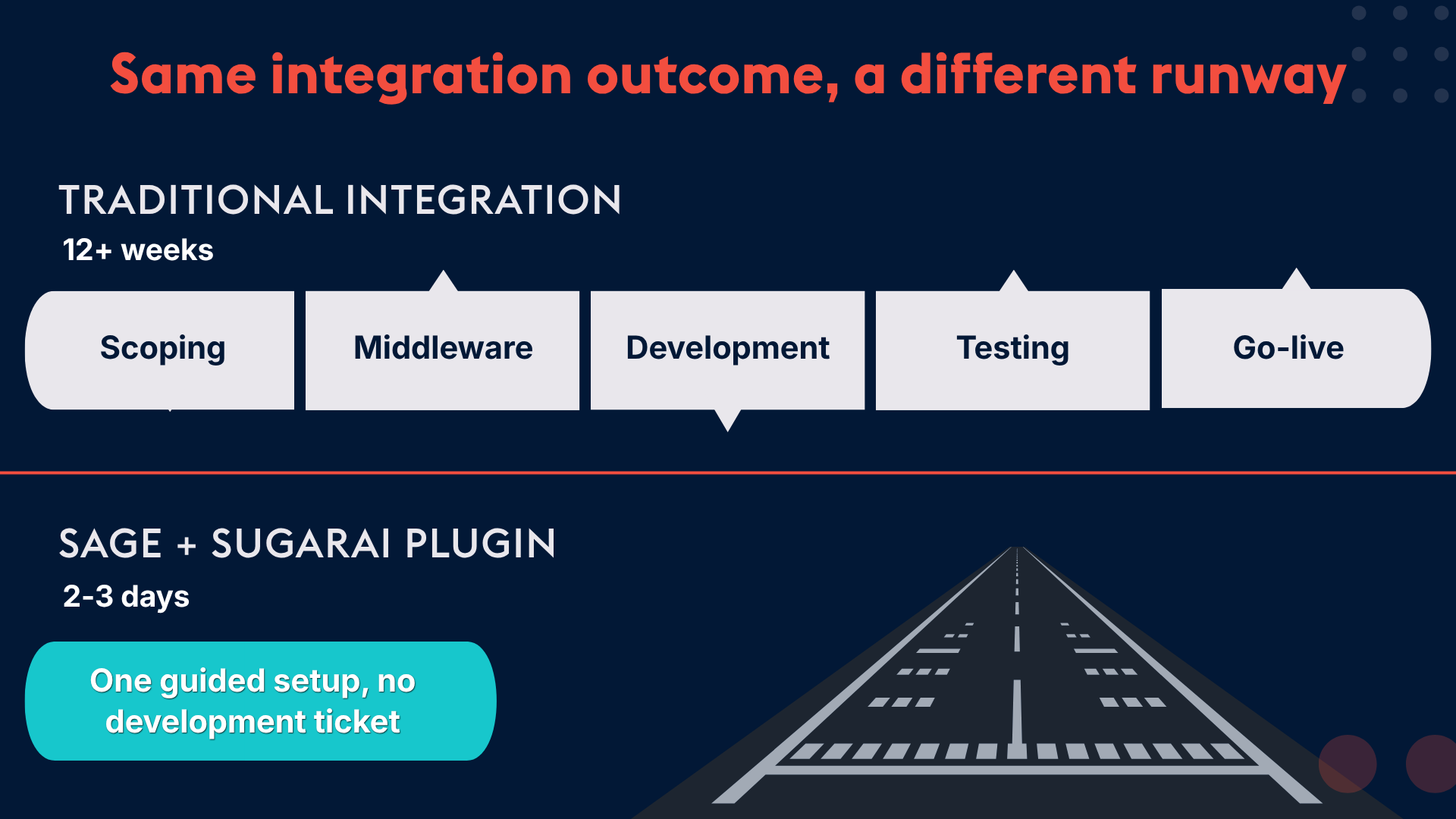
The traditional route to stages 2 and 3 involved a bespoke project: scoping calls, middleware, a developer, a multi-month IT schedule, and ongoing maintenance once it went live. For many businesses, that overhead is exactly what kept the project on the roadmap.
For Sage users: The path just got shorter
If your ERP is Sage, the conversation about integration complexity has changed.
There is now a configurable SugarAI plugin that delivers stages 2 and 3 of the ladder above without the traditional project overhead. It installs via Sugar Module Loader — no code, no custom development, no IT schedule. Configuration happens through an admin dashboard inside SugarAI, where you define what syncs, in which direction, and which business rules apply.
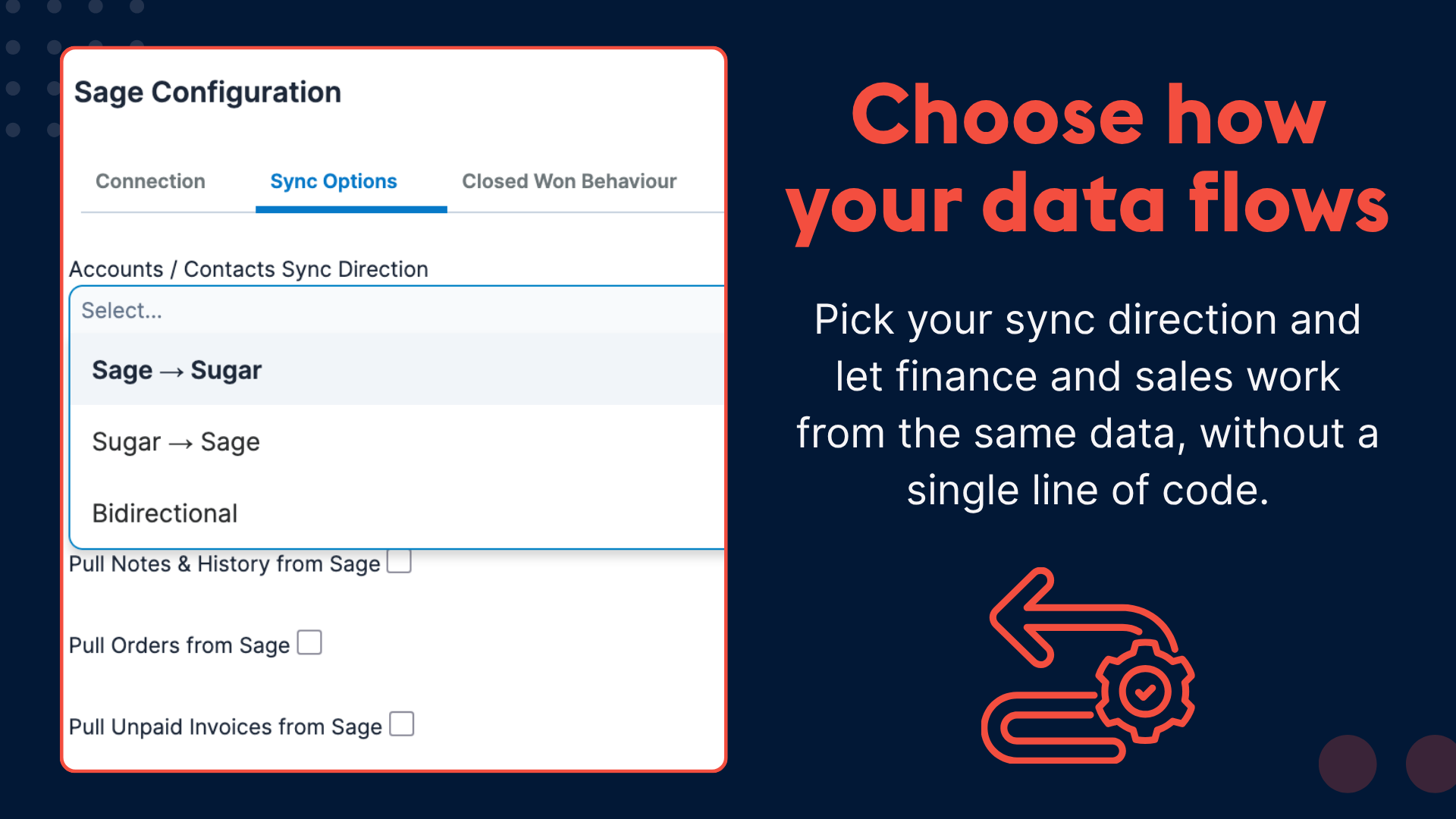
Once live, your sales team opens SugarAI and sees, on every account record: invoice history, outstanding balances, and order history — without leaving the CRM or calling accounts. Finance can configure whether Sage or SugarAI is the master for any given data type. Operations can set automated order or invoice creation in Sage when an opportunity closes in the CRM.
The result: your team stops chasing information across disconnected systems. They see the full picture of an account in one place, in real time.
This isn’t a stripped-back version of integration. It’s the same bidirectional, configurable, rule-based sync that would previously have required a project — delivered through a packaged plugin, live in days rather than quarters.
If you’re running Sage and want to understand what this would look like for your specific setup, the clearest next step is a gap analysis session: a 20-minute review of your current configuration, the data gaps costing you most, and what integration would concretely give your team.
→ Book a free gap analysis with us here.
If you’re running a different ERP
For businesses on another platform, the integration question is more involved. These integrations are typically custom projects, and the quality of the outcome depends heavily on the quality of the scoping.
Before committing to any integration project, there are six questions worth putting to any prospective integration partner:
1. Who is the data master, and for which fields? If a contact record is updated in both systems simultaneously, which one wins? This needs to be decided before build, not during it.
2. What happens to historical data? Does the integration carry across existing transaction history, or only data from the go-live date? For account intelligence purposes, history matters enormously.
3. How are sync errors handled? When a record fails to sync, how will you know, and how is it resolved — manual intervention or automated retry? Both have implications.
4. What is the maintenance model after launch? ERP updates frequently break custom integrations. Who is responsible when something stops working, and what does that support arrangement look like?
5. What does monitoring look like? Real-time sync logs, exception reports, latency alerts — what is visible, and to whom?
6. How configurable is it without going back to a developer? If your business rules change — a new product line, a restructured territory, a new field requirement — can your admin reconfigure the integration, or does every change require a development ticket?
These questions separate integration partners who have done this before from those figuring it out alongside you. The answers should be specific and, where possible, evidenced by previous projects.
The data-master decision
Whatever ERP you’re on, the data-master question deserves particular care. It is the single most common source of integration problems after go-live, and it is frequently underdiscussed during scoping.
The general principle: your ERP should remain the financial system of record. Customer invoices, transaction history, credit limits — these should be mastered in your ERP. Your CRM should be the sales and relationship system of record — contacts, call notes, opportunity stages, account intelligence from a sales perspective.
Bidirectional sync does not mean both systems are equal. It means data flows in both directions, within rules that define which system is authoritative for which field. Getting this wrong creates duplicate records, conflicting data, and the same fragmentation you were trying to escape.
Define the data-master rules before you configure anything. Document them. Make sure both your finance team and your sales team understand them.
What your team actually sees on the other side
Integration decisions stay abstract until you picture what changes for the people who will use the result.
For a sales rep: The account record in the CRM shows the customer’s last three orders, outstanding balance, and invoice history — without a call to accounts, without switching systems. They can see that a regular customer hasn’t placed an order in five weeks. They walk into renewal conversations with complete context.
For a customer service team: A customer calls about an order. The rep sees order status, delivery information, and account balance in one view, on one screen, in real time. First-call resolution becomes the norm rather than the exception.
For a sales manager: Pipeline forecasts are grounded in actual transaction data. Accounts that are quietly reducing spend become visible before they become a problem.
For finance: Manual re-entry of data across two systems stops. Order or invoice creation in the ERP triggers automatically when a deal closes in the CRM.
None of this requires a fundamental rethink of how you sell. It requires clean data, in the right place, visible to the right people at the right time. Integration is how you get there — and for a growing number of businesses, the time and cost to get there is considerably lower than it used to be.
Not sure how to start?
Book a free gap analysis session with our experts. Our team will review your current setup, identify the highest-impact data gaps, and what an integration would help you achieve. The six questions above are a good agenda for that first call.