In 2025, AI shifted from a promising concept to a practical advantage for teams using monday.com. At Provident CRM, we spent 2025 working closely with customers to help them adopt monday.com more effectively — focusing on clearer structures, stronger project visibility, and smarter ways of working that scale. Along the way, AI features began to play a meaningful role in supporting teams day to day, from surfacing insights to reducing manual effort across projects.
To explore what this means looking ahead to 2026, we sat down with Cian Brennan, monday.com Practice Lead at Provident CRM, to talk through what teams are already doing well, where AI is adding the most value, and how project managers and operations leaders can continue building on this momentum.
Read on to see how the opportunity isn’t more AI — it’s using AI well. And that starts with strong foundations.
For many organisations, 2025 marked a turning point in how AI was used within everyday project planning. Rather than experimenting with disconnected features or one-off use cases, teams began to see real value when AI was embedded directly into their workflows — supporting planning, prioritisation, and delivery at scale.
One of the biggest lessons was that AI delivers the strongest results when it’s aligned with how work actually happens. When boards are structured clearly, data is kept up to date, and teams follow consistent ways of working, AI becomes a powerful layer of intelligence that helps surface insights, highlight priorities, and reduce manual coordination.
As Cian found:
“Last year, most teams thought AI would tidy things up for them..but if their workflows were messy or their data wasn’t reliable, AI simply reflected that back,” Cian noted.
For teams who took this on board, AI quickly shifted from something to experiment with to something they could rely on. Accurate timelines, meaningful updates, and clear ownership allowed AI to spot patterns across projects, flag risks earlier, and support better decision-making without adding extra effort.
This learning mirrors a broader shift happening across industries as organisations move into 2026: success with AI isn’t about using more tools, but about focusing on a small number of high-impact use cases and backing them with strong foundations. When AI is anchored to real business processes — and supported by clean, reliable data — it stops being hype and starts becoming a genuine advantage.
In summary, 2025 showed that AI works best not as a shortcut, but as a force multiplier for teams who take their foundations seriously.
AI delivers the greatest value when it’s built into a system that already reflects how work actually happens. In project planning, that means AI works best when it can rely on consistent signals — clear ownership, accurate timelines, and meaningful updates. When those foundations are in place, AI becomes a powerful enabler rather than just another feature.
In practice, strong foundations allow AI to support teams in a few key ways:
When foundations are strong, AI doesn’t just save time — it helps teams plan with more confidence, spot issues earlier, and scale delivery without adding unnecessary complexity. And as AI becomes more deeply embedded in monday.com, these foundations will only become more valuable.
As AI becomes part of everyday work in monday.com, teams are seeing value not through dramatic transformation, but through small, practical improvements that remove friction from project delivery. These are the kinds of use cases that save time, improve visibility, and help teams stay ahead of issues without adding complexity.
Below, Cian outlined a few practical ways teams are already using AI in monday.com, without totally overhauling how they operate (you can steal these!)
One of the simplest and most widely adopted AI capabilities in monday.com is the ability to summarise updates automatically. Instead of scrolling through long comment threads to understand what’s happening on a task or project, teams can use AI to generate a clear, concise summary of activity.
For project managers, this means:
By surfacing the most relevant information in seconds, AI helps teams maintain momentum without losing detail.
AI built directly into monday.com’s status and text columns allows teams to automate small but time-consuming tasks. With a few clicks, teams can extract key information, summarise content, or generate updates based on what’s already in the board.
Common examples include:
These capabilities reduce administrative overhead and ensure boards stay up to date without relying on manual data entry.
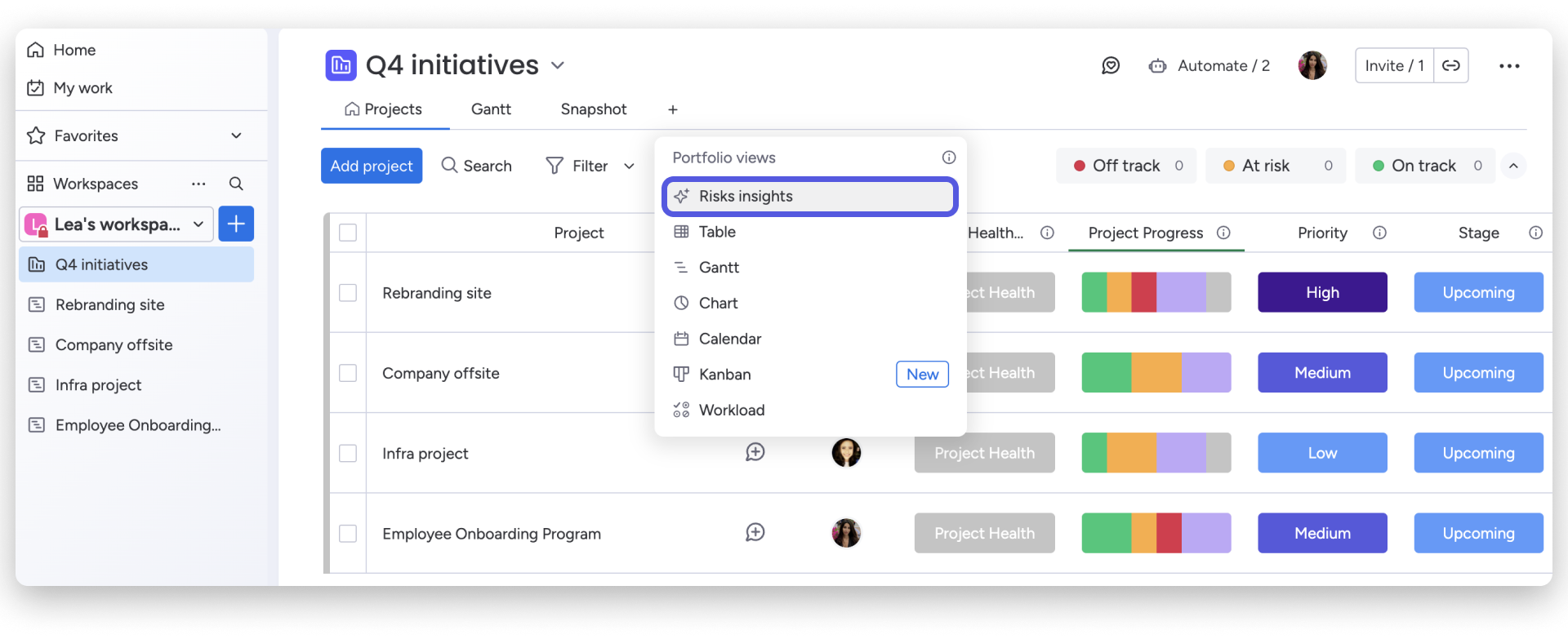
For teams managing larger portfolios, monday.com’s Enterprise Portfolio solution introduces AI-driven risk management that brings clarity at scale. Instead of monitoring multiple boards individually, AI scans connected projects and surfaces potential risks in one central view.
This includes:
Rather than reacting after issues impact delivery, teams can intervene earlier — often with a single click to notify stakeholders or adjust timelines.
AI is also helping teams manage incoming information more efficiently, particularly through monday.com forms. When customer requests or feedback are submitted, AI can automatically analyse sentiment, categorise responses, and surface insights that would otherwise require manual review.
In practice, this enables teams to:
This kind of automation helps teams stay responsive while reducing the time spent processing information behind the scenes.
Across all of these use cases, the impact is cumulative. By automating coordination, surfacing insights, and improving visibility, AI reduces the need for constant follow-ups and manual checks.
This shift allows project managers to focus on higher-value work:
When AI is built into how work flows, it supports better planning without adding pressure, helping teams work smarter as they scale into 2026.
If you’re trying to hammer out your plans for the year, just know this: teams don’t need to do more with AI — they need to be more intentional with it. The teams seeing the strongest results are the ones taking a measured approach, choosing a small number of areas where AI can genuinely make planning easier, rather than trying to automate everything at once.
In reality, that usually means starting with:
From there, AI can be layered in to support that process, whether that’s summarising updates, flagging risks, or automating routine coordination. As Cian said, “One clean, well-used board is better than five messy ones.”
AI in project management is becoming less about standout features and more about quietly supporting the work that happens every day. As intelligence is built directly into planning workflows, coordination starts to take care of itself, freeing teams to focus on delivery rather than administration.
Within monday.com, this is already showing up in practical ways — fewer follow-ups, less time jumping between boards, and earlier visibility when something isn’t going to plan. By taking care of the background coordination, AI gives project managers more space to focus on the work that actually needs their attention.
As AI becomes woven into everyday planning, its value starts to compound. Patterns emerge more clearly, risks are spotted earlier, and decisions become more informed, all without adding extra overhead or complexity. Looking ahead to 2026, the teams seeing the greatest benefit won’t be those using the most AI, but those using it consistently, in support of how they already work.
At Provident CRM, this is exactly how we approach AI and monday.com. We don’t believe in layering technology on top of broken processes or chasing features for the sake of it. Instead, we work with teams to build strong, practical foundations first — so when AI is introduced, it genuinely supports planning, delivery, and decision-making in a way that sticks.
That’s also why we don’t just talk about this stuff, we show it. Through our monday.com User Group (MUG) sessions, we create space for real conversations, live demos, and honest questions about how these tools actually work in practice. In our upcoming session, we’ll walk through all six of monday.com’s new AI features, what they’re useful for, and where teams should (and shouldn’t) be using them. It’s free to join and open to anyone who wants to get more out of monday.com.
Because preparing for AI-driven growth isn’t about keeping up with trends. It’s about building clarity, confidence, and foundations that help teams plan better — not just this year, but well into the future.
If you’d like to chat one-on-one about any of the ideas in this piece — from building stronger foundations to using AI more effectively in monday.com — we’re always happy to help. Just click the link below to get in touch.